Slow Network Detected. Some Features May Not Work Properly.

IGTV Downloader

Download IGTV Videos from Instagram in HD Quality

Download Instagram IGTV Videos Online

Snapinst offers a fast, free way to download IGTV videos from Instagram. Copy the IGTV video URL, paste it into Snapinst's downloader, and save high-quality videos to your device for offline viewing. No login or app is needed. Always respect copyright and Instagram's terms when downloading content from public accounts. Enjoy seamless downloads with Snapinst!

How To Download IGTV From Instagram
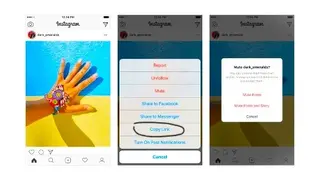
Copy the URL
1

Copy the Link

On Instagram, tap the three dots on any reel, story, post, or IGTV video and hit “Copy Link.”
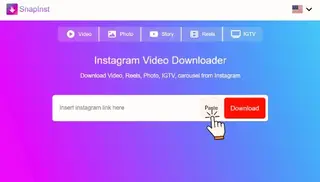
Paste the link
2

Paste It Here

Visit Snapinst , Paste the link that you have copied in the box above.
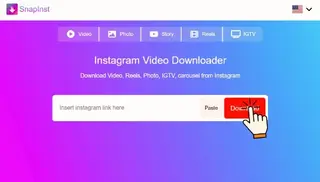
Download
3

Download What You Need

We will show you the result. Choose the Image or Video, click download — done.

Snapinst IGTV Downloader Features

Photos Downloader

Photos Downloader

Grab single photos or full carousels in original resolution

Story Downloader

Story Saver

Save stories that are normally not available after 24 hours

Video Downloader

Video Downloader

Download video posts directly from the feed or Explore tab

Reels Downloader

Reels Downloader

Save Instagram reels in full HD without any watermark

IGTV Downloader

IGTV Downloader

Store long-form content to watch later, even offline

Carousel Downloader

Highlight Backup

Download story highlights from public profiles without login

How To Download IGTV Videos From Instagram On Phone

With Snapinst, downloading IGTV videos from Instagram to your phone is simple. Open Instagram, find a public IGTV video, and copy its URL by tapping the three dots and selecting “Copy Link.” Visit Snapinst’s website on your phone’s browser, paste the URL into the downloader tool, and tap “Download.” Save the video to your Photos (iPhone) or Downloads (Android). Ensure a stable connection and respect copyright laws. Snapinst offers free, secure downloads without login.

Frequently asked questions (FAQ)

This FAQ provides information on frequent questions or concerns about the Snapinst . IGTV downloader . if you can't find the answer to your question, feel free to ask through email on our contact page.

The best tool to download IGTV videos is Snapinst. It is a reliable and user-friendly platform that allows you to download IGTV videos quickly and in high quality.

You can download IGTV videos for free by using online tools. Simply copy the IGTV video link, paste it into the downloader, and click "Download" to get the video file.

Yes, it is safe to download IGTV videos online as long as you use trusted platforms like Snapinst. It ensures a secure and hassle-free downloading experience without requiring personal information.

Absolutely! Many online tools allow you to download IGTV videos in the highest available quality, including HD, ensuring you get the best viewing experience.

No, you do not need to install any software. Most online IGTV downloaders, including Snapinst, work directly in your browser, making the process quick and easy.

Yes, most IGTV downloaders are mobile-friendly and work seamlessly on smartphones and tablets, allowing you to download videos on the go.

Online IGTV downloaders are convenient, fast, and do not require any installation. They are perfect for quickly saving your favorite IGTV videos for offline viewing.

No, private IGTV videos cannot be downloaded due to Instagram's privacy policies. Only publicly available videos can be downloaded using online tools.

You can download IGTV videos for free online by using SnapInst IGTV Downloader — the fastest and easiest tool to save Instagram IGTV videos without watermarks. Simply copy the IGTV video link, paste it into the SnapInst IGTV downloader, and click Download. Your IGTV video will be saved instantly in HD quality. SnapInst is the best free IGTV downloader for downloading Instagram IGTV videos securely and without any software installation.