


 Story
Story


SnapInst Story Saver – The Best Tool for Instagram Story Download 1080p
If you have ever been scrolling through Instagram and spotted a story that made you think, “I need to keep this,” then you know the struggle. Stories vanish in 24 hours, and unless you screen record (which ruins the quality), they are gone forever. This is where SnapInst Story Saver comes in. And honestly, when it comes to tools for this, SnapInst is the best. You can use SnapInst as many times as you wish, whether you want an Instagram story download 1080p for keeping a friend’s travel clips or saving a video, reel, or photo before it disappears.
Right now SnapInst is not just another Instagram Story Downloader. It’s fast, works directly in your browser, and does not ask for a sign-up. That is already three big wins in the story saver category. You can check it out here: Snapinst. Whether you are after a quick download story Instagram moment or need Instagram story download full HD 1080p, it is just… simple.
How to Use SnapInst for Instagram Story Download 1080p?
Let me walk you through it like we’re sitting together and you have your phone out:
Open SnapInst. Just go to Snapinst.to in your browser. No app download needed.
(See more: How to get the Instagram video link Guide For All Devices)
1
Copy the Link:
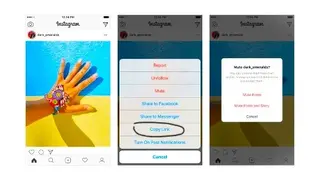
Copy the story link.From Instagram, tap the three dots on the story and hit Copy Link.
2
Paste the link into SnapInst:
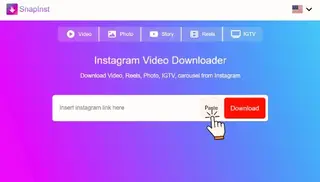
Paste the link into the SnapInst search box, click download, and in seconds, you’ll have it on your screen.
3
Click Download:
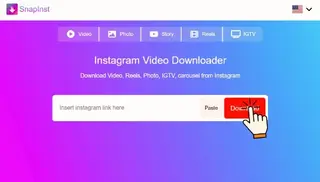
Now if your link has single media, just click the Download button under the image, and if your link has multiple media, then choose which one to download and then click the Download button to save it in your device.
That’s it. Seriously. Whether you are doing Instagram story saver without watermark or getting Instagram story video download HD 1080p, the steps are the same.
You can use it to download Instagram stories in HD from friends traveling abroad, because occasionally they capture those little cultural moments that never make it to their permanent feed.
Why People Still Struggle to Save Instagram Stories?
Here’s a little story. A friend of mine sent me a voice note in a panic last month. She had found this gorgeous wedding decor inspiration on an influencer’s story and wanted to show it to her planner. Problem? The story had less than an hour left before disappearing. She tried screen recording it, but it looked grainy, and the audio was out of sync. I sent her the SnapInsta link, and she had the Instagram story video download 1080p on her phone in a few seconds.
The thing is, Instagram does not make it easy. Stories are designed to be temporary, which is great for privacy but terrible for saving those perfect moments. This is where knowing how to download Instagram stories in high quality can be a game changer.
The Power of 1080p - Why Quality Matters
You have probably noticed this: videos and pictures look stunning on Instagram, but when you save them using random apps, they turn blurry. That is why you have to be a bit picky about the tools. SnapInst supports Instagram story download in 1080p and even higher for certain media. That means if your favorite creator uploads a crystal-clear HD video, you can download the story from Instagram without losing that crisp detail.
You can save any story using Instagram story saver,downloaded 1080p online and use it as you need. It will still look incredible after months.


